
Systems and Integrations
In May 2025, the Office of the University Registrar (OUR) implemented CourseLeaf Section Scheduler (CLSS). Any class section that will be using a general purpose or a non-general purpose location scheduled within 25Live must:
- select “25L” from the Room dropdown in CLSS
- enter a complete meeting pattern (including days and times)
- enter the appropriate room characteristic (see Academic Scheduling for more information), which aligns with 25Live room features
This will help ensure that OUR is including the correct class sections in the 25Live optimizer run.
Room Feature Definitions
Rooming - Non-General Purpose
- A space that is scheduled in 25Live but is not included in the category of General Purpose locations. Also known as “locally scheduled rooms” or “Department rooms”.
Rooming - General Purpose
- A space that is scheduled in 25Live and is in the category of General Purpose locations.
- Use SeriesQL, ::feature in ("Rooming - General Purpose [ID:78]"), in a Location Search to view the current list of General Purpose locations.
System Integrations
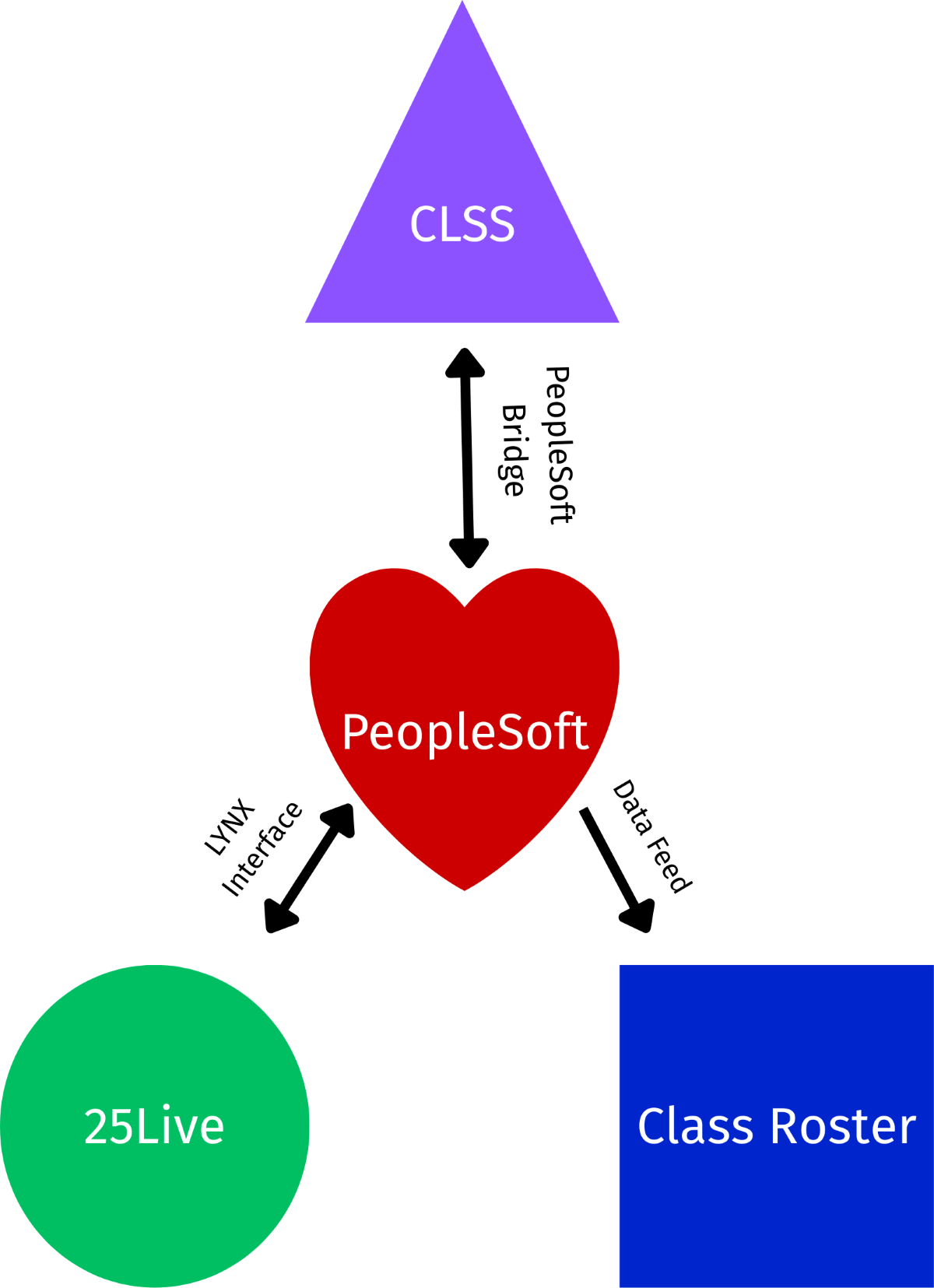
CLSS -> PeopleSoft
CLSS directly interfaces with Cornell’s student information system, PeopleSoft Campus Solutions; depending on business cycle timing, class schedule edits made in CLSS are transferred to PeopleSoft within seconds. CLSS refreshes from PeopleSoft nightly around 4:30am.
PeopleSoft -> 25Live
The room scheduling system, 25Live, directly interfaces with PeopleSoft Campus Solutions. PeopleSoft updates 25Live with class information within a few minutes of saving a change (between the hours of 6am and 9pm). Besides room assignments, no other changes should be made to class event in 25Live. Only room assignment updates are loaded back from 25Live to Peoplesoft, again within minutes of saving a change. Please keep the below in mind:
- blank room assignments are written back to PeopleSoft. When removing a room assignment, you must assign another room within the same day.
- If you do not assign another room and leave the class event without an assigned room, the facility ID is not removed from PeopleSoft, which means that the class roster will display the room that was just removed.
- multiple meeting patterns must have 1 and only 1 room assigned to each Meeting Pattern. If one of the meeting patterns doesn’t have a room assigned, the room assignments will not write back to PeopleSoft.
- If you need more than one room for a meeting pattern, you will need to create a class related event to reserve the additional space.
- If a class will be using different rooms on different days, a multiple meeting pattern should be set up on the class section and the room assigned to the appropriate meeting pattern.
PeopleSoft -> Class Roster
Class Roster, Cornell’s schedule of classes, is generated from a PeopleSoft data feed. Information displayed in the Class Roster refreshes nightly, around 8pm, from PeopleSoft.